To create a business letter in full block format means the text will all align to the left margin. Follow these few simple steps to create your business letter:
1. Open the Microsoft Word program using either an icon on your desktop or choosing it from your Start menu. When Word opens a blank document automatically appears.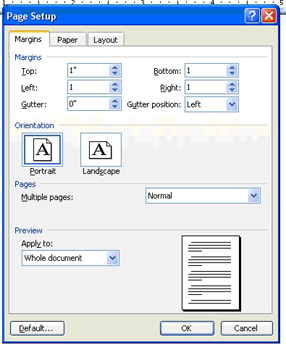
2. Set your document margins: From the File menu choose Page Setup. The document margins pop up box will appear. On the margins tab, change the Left, Right, Bottom and Top margins to 1". Use your
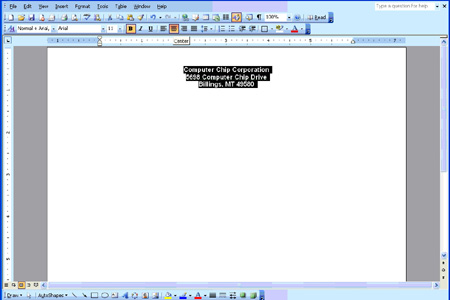
3. Create a simple but professional document by typing your company name and complete return address over the first few lines at the top of the page.
4. Now use your mouse to highlight the text you just typed. From the Format menu choose Font and select a professional font, such as Arial, from the font list. Select Bold as the font style and click the
5. Your name and address lines should still be highlighted. Now center your text
using the center icon on the formatting toolbar. Look for an icon that looks
like five straight lines centered or run you mouse over the items on the
formatting toolbar until you see Center appear. Click the icon to center text.
6. Click the left mouse key to remove the highlight and hit
7. Click the left align icon (directly next to the center icon on the left) on the formatting toolbar to return the cursor to left align status.
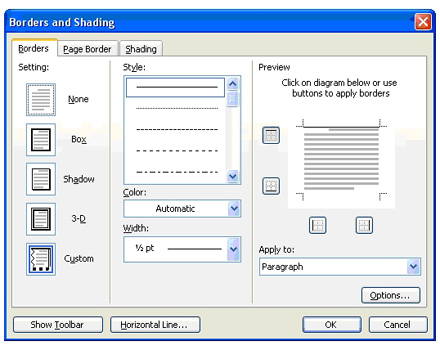
8. Now add a line under the name and address for more structure and formality. From the Format menu choose Borders and Shading and click the Borders tab. The right side of the pop up box shows the preview pane. Use your mouse and click a line above the first gray bar. Click