1. Hit
2. From the Format menu, choose Font and select an easy-to-read font for the body of your letter. Pick Times New Roman from the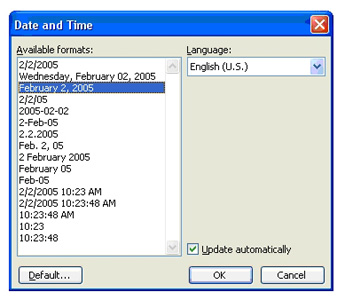 first box and normal style from the second box. Click the
3. From the Insert menu choose Date and Time.
4. Highlight the third option on the list which shows the Month Date, Year format. Click
5. Hit the
6. Type the recipient's full name and address. Hit the
7. Hit the
8. Now, use the first paragraph to state your purpose. Your purpose may be to compliment the business on its products or services, to request information, or to lodge a complaint. Also, you may introduce yourself in the first paragraph if the recipient does not already know you. If the recipient does know you (either personally or by reputation) then begin your letter by stating your main purpose for writing.
9. Use the second and third paragraphs to complete your thoughts.